Yep, we may get a tiny thank-you (read: commission) when you buy through
links on Soundfindr — not enough for a yacht, but enough to keep the lights (and
servers) on.
Learn more
62
Highlights
43
Differences
7
Reactions
0
Likes
Blue Yeti
vs
HyperX QuadCast:
62 Highlights & 43 Differences —
So, Which Microphone Actually Works Better
Let's break down these popular mics. Find out which fits your style and needs.
We put Blue Yeti and HyperX QuadCast head to head to see which microphone wins in performance, build, and price. Compare their features and connection interface, power source, onboard controls & stand/tripod now.
Blue Yeti vs HyperX QuadCast: A Comprehensive USB Microphone Showdown
When it comes to desktop USB microphones tailored for streaming, podcasting, and gaming, the Blue Yeti and HyperX QuadCast are two powerhouses that consistently captivate users. Both offer desktop form factors with USB connectivity, ensuring easy plug-and-play capabilities without the fuss of additional gear.
They share common traits such as USB powering with power indicator lights, mute functionality, and monitoring mix controls, making them user-friendly for beginners and pros alike. However, the two differ in size, design flexibility, audio specifications, and control options; distinctions that can influence your choice depending on your setup and recording needs.
Blue Yeti: Mastering Versatility and Ergonomics
The Blue Yeti stands out primarily due to its rich feature set and ergonomic design. Its four polar patterns, including Cardioid, Omnidirectional, Bidirectional, and Stereo, provide unparalleled recording flexibility. This allows creators to tailor audio capture to a variety of scenarios, from solo podcasting to multi-person interviews or ambient stereo recording.
In terms of physical footprint, the Blue Yeti has a more substantial presence on the desk, measuring 11.61 inches in height with a package depth of 11.2 inches, which can benefit stability during recording. Its detachable USB cable adds convenience, enabling easy replacements and enhanced portability; a smart feature for those who frequently take their recording setup on the move.
Audio-wise, the Blue Yeti offers detailed specifications like an overload point of 120dB, a THD (Total Harmonic Distortion) of 0.5%, and a gain range of 60dB, suggesting clear sound capture and good dynamic handling. These quantitative specs provide users with confidence in the mic's fidelity and robustness.
The onboard control suite is more comprehensive than the QuadCast's, featuring buttons, switches, and knobs, facilitating finer adjustments directly on the mic itself. Complementing this, the Blue Yeti boasts an adjustable arm/stand and swivel and pivot capabilities, allowing users to position the microphone according to their comfort and acoustic needs effortlessly.
HyperX QuadCast: Compact Efficiency for Streamers
The HyperX QuadCast appeals especially to those who prioritize a smaller, more streamlined footprint without sacrificing core functionality. This mic's compact size (standing at under 10 inches tall and with a nearly square package) makes it an excellent fit for minimal desk setups, dorm rooms, or gaming stations with limited space.
While it delivers fewer polar patterns, lacking stereo mode but still offering cardioid, omnidirectional, and bidirectional options, it covers the essentials for many streaming and gaming users. The lack of detailed specs on overload point and THD means less transparency about raw audio performance, but the device is well regarded for clean sound capture in its category.
An aspect worth noting is its static cable connection; the QuadCast does not offer a detachable USB cable, which could affect ease of transport and replacement. However, it does come with a detachable mount and a sturdy tripod stand, ready to use out of the box.
The control layout is straightforward with buttons and knobs, but it lacks switches, which slightly limits tactile precision compared to the Blue Yeti. Additionally, it doesn't offer swivel or adjustable arm support, focusing on a fixed, stable setup ideal for consistent positioning.
In terms of warranty and compliance, both mics sit at parity with 2-year warranties and standard environmental and safety certifications. Notably, neither provides advanced features like beamforming or voice tracking, keeping the tech straightforward and accessible.
Quick Take
The Blue Yeti delivers rich versatility with its multi-pattern options, precise controls, and ergonomic design, making it a powerhouse for content creators seeking adaptability and quality. Meanwhile, the HyperX QuadCast shines as a compact, budget-friendly option targeted at streamers who want solid performance in a minimal footprint. Both offer great value, but their form and control differences make them suited to distinct user preferences.
Bottom Line
For those who want unmatched customization and easy configuration, the Blue Yeti proves its worth with additional polar patterns, a detachable cable, and adjustable mounting; these are critical features for flexible recording environments. If desk space and cost are tight constraints, the HyperX QuadCast remains an excellent alternative that doesn't sacrifice core functionality despite its smaller size and simpler controls. Ultimately, the Blue Yeti is the go-to for versatility, while the QuadCast appeals as a sleek, focused streaming tool.
Verdict
Winner: Blue Yeti => Offers superior versatility with four polar patterns, comprehensive controls including switches, a detachable USB cable, and adjustable stand plus swivel capabilities that enable ergonomic and audio flexibility.
Runner-up: HyperX QuadCast => Provides a compact footprint and affordable price, delivering essential polar patterns and stable build quality geared toward streamers and gamers with limited desk space.
Side by side. The numbers. The features. No drama.
Whether you lean toward Blue Yeti or jam with HyperX QuadCast, this comparison highlights their strengths and gaps, from specs to sound to reliability.
Both Blue Yeti and HyperX QuadCast share a Desktop form factor, offering compactness and stability for desk setups. This common form factor makes both microphones equally appropriate for desktop use in podcasting and streaming environments.
Describes the physical style of the microphone.
In the battle of Form Factor,
Blue Yeti ◉ is
worse than
HyperX QuadCast ◉
, delivering
lower
3 score
measurement.
Based on community votes for Form Factor,
Blue Yeti ◉ earned
1 votes,
more than
HyperX QuadCast ◉,
which got 0 votes.
Intended Uses differ slightly with Blue Yeti targeting Podcast and Streaming, whereas HyperX QuadCast focuses on Streaming and Gaming. This makes Blue Yeti slightly more podcast-oriented and HyperX QuadCast more suited for gamers who stream.
Describes the primary application area.
In the battle of Intended Use,
Blue Yeti ◉ is
better than
HyperX QuadCast ◉
, delivering
higher
4 score
measurement.
Don’t keep it to yourself — be the first to react and review the
Intended Use on Blue Yeti ◉
vs HyperX QuadCast ◉ and help others decide!
The Polar Pattern Type of Blue Yeti includes Cardioid, Omnidirectional, Bidirectional, and Stereo, while HyperX QuadCast offers Cardioid, Omnidirectional, and Bidirectional only. Blue Yeti's additional Stereo pattern provides greater versatility, making it more suitable for varied recording needs.
Identifies the default pickup pattern.
In the battle of Polar Pattern Type,
Blue Yeti ◉ is
better than
HyperX QuadCast ◉
, delivering
higher
5 score
measurement.
Don’t keep it to yourself — be the first to react and review the
Polar Pattern Type on Blue Yeti ◉
vs HyperX QuadCast ◉ and help others decide!
Neither Blue Yeti nor HyperX QuadCast are Limited Edition models. Hence, users won't find exclusive or rare versions in either microphone, supporting regular availability and standard features across both lines.
Whether the model is a limited or special release.
In the battle of Limited Edition,
Blue Yeti ◉ is
same as
HyperX QuadCast ◉
.
Don’t keep it to yourself — be the first to react and review the
Limited Edition on Blue Yeti ◉
vs HyperX QuadCast ◉ and help others decide!
User Skill Level
What is the user skill level?
46
Blue Yeti
1Votes
Beginner, Intermediate, Professional
49
HyperX QuadCast
0Votes
Beginner, Intermediate, Professional
vs
User Skill Level
Both Blue Yeti and HyperX QuadCast target Beginner, Intermediate, and Professional skill levels, accommodating users across all experience tiers. This broad user skill compatibility ensures accessibility and ease of use for diverse users.
Recommended audience expertise level.
In the battle of User Skill Level,
Blue Yeti ◉ is
worse than
HyperX QuadCast ◉
, delivering
lower
3 score
measurement.
Based on community votes for User Skill Level,
Blue Yeti ◉ earned
1 votes,
more than
HyperX QuadCast ◉,
which got 0 votes.
Choosing the Yeti for its user skill levels, fits all my needs.
See more
Year of Release
What year was it released?
46
Blue Yeti
0Votes
2009
91
HyperX QuadCast
0Votes
2020
Blue Yeti
Year of release is 2009, indicating the model's introduction date to the market.
HyperX QuadCast
Released globally in 2020, aligning with the growing home streaming market. It remains a top choice for beginner and professional streamers alike.
Indicates when the microphone was launched.
In the battle of Year of Release,
Blue Yeti ◉ is
worse than
HyperX QuadCast ◉
, delivering
lower
45 score
measurement.
Don’t keep it to yourself — be the first to react and review the
Year of Release on Blue Yeti ◉
vs HyperX QuadCast ◉ and help others decide!
Compatibility
Which devices or platforms are compatible?
86
Blue Yeti
0Votes
PC
89
HyperX QuadCast
0Votes
PC, Mac
Blue Yeti
Compatible primarily with PC platforms, ensuring easy integration for common recording setups.
HyperX QuadCast
The HyperX QuadCast is compatible with a wide range of devices, including PC, Mac, PlayStation 5, and PlayStation 4, making it versatile for both gaming and content creation. Its plug-and-play USB connection ensures easy setup without the need for additional drivers or complicated configurations.
Lists supported platforms and devices.
In the battle of Compatibility,
Blue Yeti ◉ is
worse than
HyperX QuadCast ◉
, delivering
lower
3 score
measurement.
Don’t keep it to yourself — be the first to react and review the
Compatibility on Blue Yeti ◉
vs HyperX QuadCast ◉ and help others decide!
Connectivity Type
What is the connectivity type?
66
Blue Yeti
0Votes
USB
69
HyperX QuadCast
0Votes
USB
Blue Yeti
Connectivity type is USB, ensuring easy plug-and-play compatibility with most computers and recording devices.
HyperX QuadCast
Connects directly via USB, eliminating the need for an external audio interface. USB also powers the microphone.
Defines how the microphone connects to devices.
In the battle of Connectivity Type,
Blue Yeti ◉ is
worse than
HyperX QuadCast ◉
, delivering
lower
3 score
measurement.
Don’t keep it to yourself — be the first to react and review the
Connectivity Type on Blue Yeti ◉
vs HyperX QuadCast ◉ and help others decide!
Color Options
What are the color options?
56
Blue Yeti
0Votes
Silver
59
HyperX QuadCast
0Votes
Black, Red
Blue Yeti
The microphone comes in a silver color option, providing a sleek and professional aesthetic.
HyperX QuadCast
Features a black body with optional red LED lighting for visual feedback. Fits well in gaming and streaming setups.
Available product colors.
In the battle of Color Options,
Blue Yeti ◉ is
worse than
HyperX QuadCast ◉
, delivering
lower
3 score
measurement.
Don’t keep it to yourself — be the first to react and review the
Color Options on Blue Yeti ◉
vs HyperX QuadCast ◉ and help others decide!
Gender Target
What is the gender target?
96
Blue Yeti
0Votes
Unisex
99
HyperX QuadCast
0Votes
Unisex
Blue Yeti
Designed for unisex users, making it broadly accessible without gender-specific features.
HyperX QuadCast
Designed for all genders with universal streaming and recording applications. No specific age limitations for adult users.
The marketing target by gender (if specified).
In the battle of Gender Target,
Blue Yeti ◉ is
worse than
HyperX QuadCast ◉
, delivering
lower
3 score
measurement.
Don’t keep it to yourself — be the first to react and review the
Gender Target on Blue Yeti ◉
vs HyperX QuadCast ◉ and help others decide!
Age Group
What is the age group?
73
Blue Yeti
0Votes
Teen, Adult, Professional
79
HyperX QuadCast
0Votes
Adult, Professional
Blue Yeti
Designed for a wide age group including teens, adults, and professionals to suit diverse users and skill levels.
HyperX QuadCast
Suitable for adults and professional content creators. Not intended for children or casual toy use.
The intended user age bracket.
In the battle of Age Group,
Blue Yeti ◉ is
worse than
HyperX QuadCast ◉
, delivering
lower
6 score
measurement.
Don’t keep it to yourself — be the first to react and review the
Age Group on Blue Yeti ◉
vs HyperX QuadCast ◉ and help others decide!
Launch Region
Where is it available?
66
Blue Yeti
0Votes
Global
69
HyperX QuadCast
0Votes
Global
Blue Yeti
This product is marketed and available globally, catering to a wide range of users worldwide.
HyperX QuadCast
Available worldwide through official HyperX retailers and online stores. Ensures consistent performance across regions.
Where the product is primarily available.
In the battle of Launch Region,
Blue Yeti ◉ is
worse than
HyperX QuadCast ◉
, delivering
lower
3 score
measurement.
Don’t keep it to yourself — be the first to react and review the
Launch Region on Blue Yeti ◉
vs HyperX QuadCast ◉ and help others decide!
Product Type
What is the product type?
61
Blue Yeti
0Votes
Condenser, USB
79
HyperX QuadCast
0Votes
USB
HyperX QuadCast
This is a plug-and-play USB microphone, so no external audio interface is needed. It works seamlessly with PCs, Macs, and gaming consoles.
Defines the basic category of the microphone.
In the battle of Product Type,
Blue Yeti ◉ is
worse than
HyperX QuadCast ◉
, delivering
lower
18 score
measurement.
Don’t keep it to yourself — be the first to react and review the
Product Type on Blue Yeti ◉
vs HyperX QuadCast ◉ and help others decide!
Model Name
What is the model name?
66
Blue Yeti
0Votes
YETI
65
HyperX QuadCast
0Votes
QuadCast
HyperX QuadCast
The QuadCast is known for its red LED lighting and integrated shock mount. It’s a popular choice among streamers and content creators.
The specific product identifier from the manufacturer.
In the battle of Model Name,
Blue Yeti ◉ is
better than
HyperX QuadCast ◉
, delivering
higher
1 score
measurement.
Don’t keep it to yourself — be the first to react and review the
Model Name on Blue Yeti ◉
vs HyperX QuadCast ◉ and help others decide!
Series/Line
What series/line does it belong to?
52
Blue Yeti
0Votes
Yeti Series
Who knows?
0Votes
HyperX QuadCast
(Help us out by suggesting one!)
Blue Yeti
Belongs to the well-known 'Yeti' series, a trusted name in USB microphones for streaming and podcasting.
Identifies the product line or collection the microphone belongs to.
Don’t keep it to yourself — be the first to react and review the
Series/Line on Blue Yeti ◉
vs HyperX QuadCast ◉ and help others decide!
Country of Origin
What is the country of origin?
71
Blue Yeti
0Votes
China
74
HyperX QuadCast
0Votes
China
HyperX QuadCast
Most HyperX peripherals are manufactured in China, following standard quality control. The exact country of origin is not officially confirmed.
Manufacturing or design origin.
In the battle of Country of Origin,
Blue Yeti ◉ is
worse than
HyperX QuadCast ◉
, delivering
lower
3 score
measurement.
Don’t keep it to yourself — be the first to react and review the
Country of Origin on Blue Yeti ◉
vs HyperX QuadCast ◉ and help others decide!
Mounting Type
What is the mounting type?
56
Blue Yeti
0Votes
Desktop Base, Boom Arm
59
HyperX QuadCast
0Votes
Stand, Shock Mount
HyperX QuadCast
Includes a built-in anti-vibration shock mount for stable recordings. Compatible with most standard microphone stands.
The typical mounting or support style.
In the battle of Mounting Type,
Blue Yeti ◉ is
worse than
HyperX QuadCast ◉
, delivering
lower
3 score
measurement.
Don’t keep it to yourself — be the first to react and review the
Mounting Type on Blue Yeti ◉
vs HyperX QuadCast ◉ and help others decide!
Recording Application Category
What recording applications is it best for?
84
Blue Yeti
0Votes
Podcast, Broadcast, Streaming, Studio
85
HyperX QuadCast
0Votes
Podcast, Streaming
HyperX QuadCast
Ideal for both podcasting and live streaming, capturing clear voice audio for content creation.
Specific contexts where the mic is best suited.
In the battle of Recording Application Category,
Blue Yeti ◉ is
worse than
HyperX QuadCast ◉
, delivering
lower
1 score
measurement.
Don’t keep it to yourself — be the first to react and review the
Recording Application Category on Blue Yeti ◉
vs HyperX QuadCast ◉ and help others decide!
The Package Width of Blue Yeti is 6.7 inches compared to HyperX QuadCast's smaller 5.91 inches. Blue Yeti's larger packaging may imply a slightly bigger product or accessories included, influencing storage and transport preferences.
The shipping package’s width.
In the battle of Package Width,
Blue Yeti ◉ is
worse than
HyperX QuadCast ◉
, delivering
higher
0.8 inch
measurement.
Don’t keep it to yourself — be the first to react and review the
Package Width on Blue Yeti ◉
vs HyperX QuadCast ◉ and help others decide!
Blue Yeti's Package Depth measures 11.2 inches, nearly twice that of HyperX QuadCast's 5.91 inches. This considerable difference suggests Blue Yeti's packaging is bulkier, which could affect shipping and shelf space considerations.
The shipping package’s depth.
In the battle of Package Depth,
Blue Yeti ◉ is
worse than
HyperX QuadCast ◉
, delivering
higher
5.3 inch
measurement.
Don’t keep it to yourself — be the first to react and review the
Package Depth on Blue Yeti ◉
vs HyperX QuadCast ◉ and help others decide!
Height favors Blue Yeti with 11.61 inches versus HyperX QuadCast's shorter 9.82 inches. Blue Yeti’s taller stature could affect desk space usage and presence, appealing to those wanting a more prominent microphone setup.
The microphone’s overall height.
In the battle of Height,
Blue Yeti ◉ is
worse than
HyperX QuadCast ◉
, delivering
higher
1.8 inch
measurement.
Don’t keep it to yourself — be the first to react and review the
Height on Blue Yeti ◉
vs HyperX QuadCast ◉ and help others decide!
Width
What is the width?
4.72
inch
0Votes
5.06
inch
0Votes
Blue Yeti
Width measures 4.72 inches (11.99 cm), reflecting the size of the microphone body.
HyperX QuadCast
This is about 12.85 cm wide, roughly the width of a standard hardcover book. It’s compact enough to fit comfortably on most desktop setups.
The microphone’s overall width.
In the battle of Width,
Blue Yeti ◉ is
better than
HyperX QuadCast ◉
, delivering
lower
0.3 inch
measurement.
Don’t keep it to yourself — be the first to react and review the
Width on Blue Yeti ◉
vs HyperX QuadCast ◉ and help others decide!
Equivalent to 10.16 cm, similar to the depth of a small tablet. This makes the microphone easy to position without taking up much desk space.
The microphone’s overall depth.
In the battle of Depth,
Blue Yeti ◉ is
worse than
HyperX QuadCast ◉
, delivering
higher
0.9 inch
measurement.
Don’t keep it to yourself — be the first to react and review the
Depth on Blue Yeti ◉
vs HyperX QuadCast ◉ and help others decide!
Package Height
What is the package height?
10.5
inch
0Votes
9.06
inch
0Votes
Blue Yeti
Package height is 10.5 inches (26.67 cm), detailing the boxed product size for shipping or storage.
HyperX QuadCast
Around 23 cm including packaging materials. Fits easily in storage or shelving.
The shipping package’s height.
In the battle of Package Height,
Blue Yeti ◉ is
worse than
HyperX QuadCast ◉
, delivering
higher
1.4 inch
measurement.
Don’t keep it to yourself — be the first to react and review the
Package Height on Blue Yeti ◉
vs HyperX QuadCast ◉ and help others decide!
Weight
What is the weight?
3.2
lbs
0Votes
0.55
lbs
0Votes
Blue Yeti
The weight is 3.2 pounds (1.45 kg), making it relatively sturdy yet portable for a desktop microphone.
HyperX QuadCast
Around 0.25 kg, making it as light as a small laptop, so it’s stable on a desk stand without tipping.
The microphone’s physical weight.
In the battle of Weight,
Blue Yeti ◉ is
worse than
HyperX QuadCast ◉
, delivering
higher
2.7 lbs
measurement.
Don’t keep it to yourself — be the first to react and review the
Weight on Blue Yeti ◉
vs HyperX QuadCast ◉ and help others decide!
Cable Length
What is the cable length?
6.5
ft
0Votes
9.84
ft
0Votes
Blue Yeti
Cable length is 6.5 feet (1.98 meters), providing ample reach for desktop setup flexibility.
HyperX QuadCast
Approximately 3 meters, long enough to reach from your PC or console to your desktop without stretching.
Length of the included or integrated cable.
In the battle of Cable Length,
Blue Yeti ◉ is
worse than
HyperX QuadCast ◉
, delivering
lower
3.3 ft
measurement.
Don’t keep it to yourself — be the first to react and review the
Cable Length on Blue Yeti ◉
vs HyperX QuadCast ◉ and help others decide!
Mounting Thread Size
What is the mounting thread size?
96
Blue Yeti
0Votes
5/8"
99
HyperX QuadCast
0Votes
5/8"
Blue Yeti
Features a 5/8-inch mounting thread size, which is a common thread size compatible with many microphone stands and shock mounts.
HyperX QuadCast
The HyperX QuadCast includes a threaded mount adapter that allows it to attach securely to most standard microphone stands. This dual compatibility with 3/8″ and 5/8″ threads makes it easy to switch between different mounts without needing additional accessories.
The thread size for mounting compatibility.
In the battle of Mounting Thread Size,
Blue Yeti ◉ is
worse than
HyperX QuadCast ◉
, delivering
lower
3 score
measurement.
Don’t keep it to yourself — be the first to react and review the
Mounting Thread Size on Blue Yeti ◉
vs HyperX QuadCast ◉ and help others decide!
Stand/Arm Length
What is the stand/arm length?
6
inch
0Votes
Who knows?
0Votes
HyperX QuadCast
(Help us out by suggesting one!)
Blue Yeti
Stand or arm length is 6 inches (15.24 cm), suitable for desktop use and easy adjustment.
Maximum length of included stand or boom arm.
Don’t keep it to yourself — be the first to react and review the
Stand/Arm Length on Blue Yeti ◉
vs HyperX QuadCast ◉ and help others decide!
Capsule Diameter
What is the capsule diameter?
0.55
inch
0Votes
0.55
inch
0Votes
vs
Capsule Diameter
Capsule Diameter matches at 0.55 inches for both Blue Yeti and HyperX QuadCast, indicating similar microphone capsule sizes which impact sound capture characteristics and frequency response reliability.
The diameter of the microphone capsule.
In the battle of Capsule Diameter,
Blue Yeti ◉ is
same as
HyperX QuadCast ◉
, delivering
equal
0.55 inch
measurement.
Don’t keep it to yourself — be the first to react and review the
Capsule Diameter on Blue Yeti ◉
vs HyperX QuadCast ◉ and help others decide!
Capsule Length
What is the capsule length?
0.8
inch
0Votes
Who knows?
0Votes
HyperX QuadCast
(Help us out by suggesting one!)
vs
Capsule Length
Blue Yeti offers a Capsule Length of 0.8 inches, while HyperX QuadCast does not provide this specification. This means detailed capsule measurements are available only for Blue Yeti, which may interest users focused on technical microphone design.
The length of the microphone capsule.
Don’t keep it to yourself — be the first to react and review the
Capsule Length on Blue Yeti ◉
vs HyperX QuadCast ◉ and help others decide!
Grill Diameter
What is the grill diameter?
2.4
inch
0Votes
Who knows?
0Votes
HyperX QuadCast
(Help us out by suggesting one!)
Blue Yeti
Grill diameter is 2.4 inches (6.10 cm), providing physical protection for the capsule while allowing good sound transmission.
The diameter of the protective microphone grill.
Don’t keep it to yourself — be the first to react and review the
Grill Diameter on Blue Yeti ◉
vs HyperX QuadCast ◉ and help others decide!
Base Footprint Diameter
What is the base/stand footprint diameter?
4.5
inch
0Votes
Who knows?
0Votes
HyperX QuadCast
(Help us out by suggesting one!)
Diameter of the microphone base or stand footprint.
Don’t keep it to yourself — be the first to react and review the
Base Footprint Diameter on Blue Yeti ◉
vs HyperX QuadCast ◉ and help others decide!
Who knows?
0Votes
HyperX QuadCast
(Help us out by suggesting one!)
vs
Overload Point
Blue Yeti offers an Overload Point of 120 dB, while HyperX QuadCast does not disclose this value. Blue Yeti's high overload point suggests better handling of loud sound sources without distortion, favoring demanding audio inputs.
The SPL level where overload occurs.
Based on community votes for Overload Point,
Blue Yeti ◉ earned
2 votes,
more than
HyperX QuadCast ◉,
which got 0 votes.
Can't beat the Blue Yeti's flexibility, the audio specs are impressive.
See more
Frequency Response (Min)
What is the minimum frequency response?
20
Hz
0Votes
20
Hz
0Votes
Blue Yeti
The frequency response starts at 20 Hz, capable of capturing deep bass sounds.
HyperX QuadCast
Captures deep bass tones for a natural voice sound. Useful for rich, full audio recording.
The lowest frequency the mic can capture.
In the battle of Frequency Response (Min),
Blue Yeti ◉ is
same as
HyperX QuadCast ◉
, delivering
equal
20.00 Hz
measurement.
Don’t keep it to yourself — be the first to react and review the
Frequency Response (Min) on Blue Yeti ◉
vs HyperX QuadCast ◉ and help others decide!
Sensitivity
What is the sensitivity?
-37
dBV/Pa
0Votes
-36
dBV/Pa
0Votes
Blue Yeti
Sensitivity is rated at -37 dBV/Pa, indicating the microphone's output voltage level relative to the sound pressure level.
HyperX QuadCast
The HyperX QuadCast has a sensitivity of –36 dB, meaning it can pick up even quiet sounds clearly at 1 kHz. This level of sensitivity ensures accurate voice capture for streaming, podcasting, and other content creation without requiring excessive gain.
Output level relative to sound pressure.
In the battle of Sensitivity,
Blue Yeti ◉ is
worse than
HyperX QuadCast ◉
, delivering
lower
1.0 dBV/Pa
measurement.
Don’t keep it to yourself — be the first to react and review the
Sensitivity on Blue Yeti ◉
vs HyperX QuadCast ◉ and help others decide!
Signal-to-Noise Ratio
What is the SNR?
100
dB
0Votes
90
dB
0Votes
Blue Yeti
Signal-to-noise ratio is 100 dB, indicating clear audio capture with relatively low noise floor.
HyperX QuadCast
The HyperX QuadCast has a signal-to-noise ratio of ≥ 90 dB, which means it can deliver clear audio with minimal background noise. This high SNR ensures that your voice recordings remain crisp and professional, even in environments with ambient sounds.
The clarity ratio between signal and background noise.
In the battle of Signal-to-Noise Ratio,
Blue Yeti ◉ is
better than
HyperX QuadCast ◉
, delivering
higher
10.0 dB
measurement.
Don’t keep it to yourself — be the first to react and review the
Signal-to-Noise Ratio on Blue Yeti ◉
vs HyperX QuadCast ◉ and help others decide!
Gain Range
What is the gain range?
60
dB
1Votes
Who knows?
0Votes
HyperX QuadCast
(Help us out by suggesting one!)
vs
Gain Range
Gain Range is stated as 60 dB for Blue Yeti, but n/a for HyperX QuadCast. Blue Yeti provides a wide gain adjustment spectrum, affording more control over input sensitivity, unlike HyperX QuadCast which lacks this information.
The adjustable gain span.
Based on community votes for Gain Range,
Blue Yeti ◉ earned
1 votes,
more than
HyperX QuadCast ◉,
which got 0 votes.
Supports multiple directionality modes including cardioid, omnidirectional, bidirectional, and stereo to cover diverse recording scenarios.
General pickup orientation.
In the battle of Directionality,
Blue Yeti ◉ is
better than
HyperX QuadCast ◉
, delivering
higher
13 score
measurement.
Don’t keep it to yourself — be the first to react and review the
Directionality on Blue Yeti ◉
vs HyperX QuadCast ◉ and help others decide!
Output Impedance
What is the output impedance?
16
ohm
0Votes
Who knows?
0Votes
HyperX QuadCast
(Help us out by suggesting one!)
Blue Yeti
Output impedance is 16 ohms, compatible with standard audio interfaces and headphones.
Electrical resistance of the microphone’s output.
Don’t keep it to yourself — be the first to react and review the
Output Impedance on Blue Yeti ◉
vs HyperX QuadCast ◉ and help others decide!
THD
What is the THD (total Harmonic Distortion)?
0.5
%
0Votes
Who knows?
0Votes
HyperX QuadCast
(Help us out by suggesting one!)
vs
THD
Total Harmonic Distortion (THD) is 0.5% for Blue Yeti, with no data available for HyperX QuadCast. Blue Yeti's low distortion figure indicates good audio clarity, whereas QuadCast's distortion performance remains unspecified.
Distortion added at high volumes.
Don’t keep it to yourself — be the first to react and review the
THD on Blue Yeti ◉
vs HyperX QuadCast ◉ and help others decide!
Stereo/Mono Mode
What mode is supported?
56
Blue Yeti
0Votes
Dual (Stereo & Mono)
29
HyperX QuadCast
0Votes
Stereo
Blue Yeti
The microphone supports both stereo and mono modes, allowing versatile audio channel configurations.
vs
Score History
Updated at 2025-12-05 01:39:01: 0Updated at 2025-12-05 01:39:01: 0Updated at 2026-02-28 02:35:03: 85Updated at 2026-02-28 02:35:03: 85
Score info for Blue Yeti :
We base our scoring on 'Stereo/Mono Mode' on the following:
Score 0: Supports both stereo and mono modes, showing greater versatility.. Score reduced because release date is older
Score info for HyperX QuadCast:
We base our scoring on 'Stereo/Mono Mode' on the following:
Score 85: Dual-channel recording mode, more advanced than mono.. Score reduced because release date is older
Score 85: Dual-channel recording mode, more advanced than mono.. Score reduced because release date is older
Determines recording mode.
In the battle of Stereo/Mono Mode,
Blue Yeti ◉ is
better than
HyperX QuadCast ◉
, delivering
higher
27 score
measurement.
Don’t keep it to yourself — be the first to react and review the
Stereo/Mono Mode on Blue Yeti ◉
vs HyperX QuadCast ◉ and help others decide!
Acoustic Principle
What is the acoustic principle?
66
Blue Yeti
0Votes
Pressure Gradient
69
HyperX QuadCast
0Votes
Pressure Gradient
Blue Yeti
Operates on the pressure gradient principle, common in condenser microphones for accurate directional response.
The underlying sound capture mechanism.
In the battle of Acoustic Principle,
Blue Yeti ◉ is
worse than
HyperX QuadCast ◉
, delivering
lower
3 score
measurement.
Don’t keep it to yourself — be the first to react and review the
Acoustic Principle on Blue Yeti ◉
vs HyperX QuadCast ◉ and help others decide!
Headroom
What is the headroom?
20
dB
0Votes
Who knows?
0Votes
HyperX QuadCast
(Help us out by suggesting one!)
Blue Yeti
The microphone provides a headroom of 20 dB, allowing it to handle loud sound sources without distortion.
Range above nominal operating level before distortion.
Don’t keep it to yourself — be the first to react and review the
Headroom on Blue Yeti ◉
vs HyperX QuadCast ◉ and help others decide!
Transient Response
What is the transient response?
96
Blue Yeti
0Votes
Fast
49
HyperX QuadCast
0Votes
Medium
Blue Yeti
Has fast transient response, meaning it can accurately capture quick changes in sound such as percussive attacks.
Ability to capture sudden sound changes.
In the battle of Transient Response,
Blue Yeti ◉ is
better than
HyperX QuadCast ◉
, delivering
higher
47 score
measurement.
Don’t keep it to yourself — be the first to react and review the
Transient Response on Blue Yeti ◉
vs HyperX QuadCast ◉ and help others decide!
Off-Axis Rejection
What is the off-axis rejection?
15
dB
0Votes
Who knows?
0Votes
HyperX QuadCast
(Help us out by suggesting one!)
Blue Yeti
Off-axis rejection of 15 dB helps reduce unwanted sounds coming from the sides or rear of the microphone.
Sensitivity drop when sound comes from the side/rear.
Don’t keep it to yourself — be the first to react and review the
Off-Axis Rejection on Blue Yeti ◉
vs HyperX QuadCast ◉ and help others decide!
Polar Pattern Switching Precision
What is the switching precision?
61
Blue Yeti
0Votes
Stepped
97
HyperX QuadCast
0Votes
Continuous
Blue Yeti
The polar pattern switching is stepped, allowing distinct selection between modes to tailor the microphone's directional characteristics.
The accuracy of selectable polar patterns.
In the battle of Polar Pattern Switching Precision,
Blue Yeti ◉ is
worse than
HyperX QuadCast ◉
, delivering
lower
36 score
measurement.
Don’t keep it to yourself — be the first to react and review the
Polar Pattern Switching Precision on Blue Yeti ◉
vs HyperX QuadCast ◉ and help others decide!
Output Level
What is the output level?
-37
dBV/Pa
0Votes
Who knows?
0Votes
HyperX QuadCast
(Help us out by suggesting one!)
Blue Yeti
Output level is -37 dBV/Pa, consistent with the microphone's sensitivity rating.
The output voltage relative to input pressure.
Don’t keep it to yourself — be the first to react and review the
Output Level on Blue Yeti ◉
vs HyperX QuadCast ◉ and help others decide!
Internal Preamp Quality
What is the internal preamp quality?
44
Blue Yeti
0Votes
Standard
Who knows?
0Votes
HyperX QuadCast
(Help us out by suggesting one!)
Blue Yeti
Features a standard internal preamp, providing reliable amplification suitable for most podcasting and streaming needs.
Describes the built-in preamp’s fidelity.
Don’t keep it to yourself — be the first to react and review the
Internal Preamp Quality on Blue Yeti ◉
vs HyperX QuadCast ◉ and help others decide!
Transformer/Transformerless Design
What design does it use?
96
Blue Yeti
0Votes
Transformerless
99
HyperX QuadCast
0Votes
Transformerless
Blue Yeti
Built with a transformerless design which typically offers better sound fidelity and lower distortion.
The electrical coupling approach used.
In the battle of Transformer/Transformerless Design,
Blue Yeti ◉ is
worse than
HyperX QuadCast ◉
, delivering
lower
3 score
measurement.
Don’t keep it to yourself — be the first to react and review the
Transformer/Transformerless Design on Blue Yeti ◉
vs HyperX QuadCast ◉ and help others decide!
Frequency Response (Max)
What is the maximum frequency response?
20,000
Hz
0Votes
20,000
Hz
0Votes
The highest frequency the mic can capture.
In the battle of Frequency Response (Max),
Blue Yeti ◉ is
same as
HyperX QuadCast ◉
, delivering
equal
20,000.00 Hz
measurement.
Don’t keep it to yourself — be the first to react and review the
Frequency Response (Max) on Blue Yeti ◉
vs HyperX QuadCast ◉ and help others decide!
Minimum Terminating Impedance
What is the minimum terminating impedance?
Who knows?
0Votes
Blue Yeti
(Help us out by suggesting one!)
Who knows?
0Votes
HyperX QuadCast
(Help us out by suggesting one!)
The minimum load impedance required for optimal microphone performance and to avoid signal distortion.
Don’t keep it to yourself — be the first to react and review the
Minimum Terminating Impedance on Blue Yeti ◉
vs HyperX QuadCast ◉ and help others decide!
Pre-Attenuation Pad
What is the pre-attenuation pad?
Who knows?
0Votes
Blue Yeti
(Help us out by suggesting one!)
Who knows?
0Votes
HyperX QuadCast
(Help us out by suggesting one!)
Built-in reduction for handling loud signals.
Don’t keep it to yourself — be the first to react and review the
Pre-Attenuation Pad on Blue Yeti ◉
vs HyperX QuadCast ◉ and help others decide!
Low-Cut Filter
What is the low-cut filter cutoff?
Who knows?
0Votes
Blue Yeti
(Help us out by suggesting one!)
Who knows?
0Votes
HyperX QuadCast
(Help us out by suggesting one!)
Removes low-end rumble.
Don’t keep it to yourself — be the first to react and review the
Low-Cut Filter on Blue Yeti ◉
vs HyperX QuadCast ◉ and help others decide!
Voice Isolation Feature
Does it have voice isolation?
No
0Votes
Blue Yeti
No
0Votes
HyperX QuadCast
Whether the mic includes isolation tech.
In the battle of Voice Isolation Feature,
Blue Yeti ◉ is
same as
HyperX QuadCast ◉
.
Don’t keep it to yourself — be the first to react and review the
Voice Isolation Feature on Blue Yeti ◉
vs HyperX QuadCast ◉ and help others decide!
Proximity Effect Control
Does it have proximity effect control?
No
0Votes
Blue Yeti
No
0Votes
HyperX QuadCast
vs
Proximity Effect Control
Neither Blue Yeti nor HyperX QuadCast include Proximity Effect Control, which could influence quality near microphone position. Users avoiding proximity sensitivity may find both microphones equally limited in this respect.
Whether it has control for bass buildup at close range.
In the battle of Proximity Effect Control,
Blue Yeti ◉ is
same as
HyperX QuadCast ◉
.
Don’t keep it to yourself — be the first to react and review the
Proximity Effect Control on Blue Yeti ◉
vs HyperX QuadCast ◉ and help others decide!
Acoustic Noise Isolation Rating
What is the acoustic noise isolation rating?
Who knows?
0Votes
Blue Yeti
(Help us out by suggesting one!)
Who knows?
0Votes
HyperX QuadCast
(Help us out by suggesting one!)
Rating for rejecting ambient noise.
Don’t keep it to yourself — be the first to react and review the
Acoustic Noise Isolation Rating on Blue Yeti ◉
vs HyperX QuadCast ◉ and help others decide!
Both Blue Yeti and HyperX QuadCast connect via USB, enabling straightforward plug-and-play with most computers. This shared interface suits users seeking easy setup with broad compatibility.
Defines the main interface for connectivity.
In the battle of Connection Interface,
Blue Yeti ◉ is
worse than
HyperX QuadCast ◉
, delivering
lower
3 score
measurement.
Don’t keep it to yourself — be the first to react and review the
Connection Interface on Blue Yeti ◉
vs HyperX QuadCast ◉ and help others decide!
Who knows?
0Votes
Blue Yeti
(Help us out by suggesting one!)
Who knows?
0Votes
HyperX QuadCast
(Help us out by suggesting one!)
Frequency spectrum range for mics.
Don’t keep it to yourself — be the first to react and review the
RF Frequency Range on Blue Yeti ◉
vs HyperX QuadCast ◉ and help others decide!
Cable Detachable
Is the cable detachable?
Yes
0Votes
Blue Yeti
No
0Votes
HyperX QuadCast
vs
Cable Detachable
Blue Yeti features a Detachable Cable, enhancing portability and cable replacement ease, while HyperX QuadCast does not have this feature. This makes Blue Yeti more flexible for transport and maintenance.
Whether the cable can be detached or replaced.
In the battle of Cable Detachable,
Blue Yeti ◉ is
better than
HyperX QuadCast ◉
, delivering
higher
36 score
measurement.
Don’t keep it to yourself — be the first to react and review the
Cable Detachable on Blue Yeti ◉
vs HyperX QuadCast ◉ and help others decide!
USB Compatibility
What USB versions are compatible?
30
Blue Yeti
0Votes
USB 2.0, USB-A
35
HyperX QuadCast
0Votes
USB 2.0
Blue Yeti
Compatible with USB 2.0 and USB-A ports, ensuring widespread support across computers and devices.
Identifies supported USB standards.
In the battle of USB Compatibility,
Blue Yeti ◉ is
worse than
HyperX QuadCast ◉
, delivering
lower
5 score
measurement.
Don’t keep it to yourself — be the first to react and review the
USB Compatibility on Blue Yeti ◉
vs HyperX QuadCast ◉ and help others decide!
Audio Output Options
What are the audio output options?
59
Blue Yeti
0Votes
Digital, Unbalanced
49
HyperX QuadCast
0Votes
Analog
Blue Yeti
Audio output options include digital and unbalanced formats, providing compatibility with various recording setups.
Lists output signal formats available.
In the battle of Audio Output Options,
Blue Yeti ◉ is
better than
HyperX QuadCast ◉
, delivering
higher
10 score
measurement.
Don’t keep it to yourself — be the first to react and review the
Audio Output Options on Blue Yeti ◉
vs HyperX QuadCast ◉ and help others decide!
Interface Latency
What is the interface latency?
5
ms
0Votes
Who knows?
0Votes
HyperX QuadCast
(Help us out by suggesting one!)
Blue Yeti
The interface latency is 5 milliseconds, contributing to low-latency monitoring and minimal audio delay.
Latency introduced by the interface.
Don’t keep it to yourself — be the first to react and review the
Interface Latency on Blue Yeti ◉
vs HyperX QuadCast ◉ and help others decide!
Balanced/Unbalanced Output
What is the output type?
16
Blue Yeti
0Votes
Unbalanced
19
HyperX QuadCast
0Votes
Unbalanced
Blue Yeti
Output is unbalanced, which is common for USB microphones designed for straightforward connection setups.
Defines the type of electrical signal output.
In the battle of Balanced/Unbalanced Output,
Blue Yeti ◉ is
worse than
HyperX QuadCast ◉
, delivering
lower
3 score
measurement.
Don’t keep it to yourself — be the first to react and review the
Balanced/Unbalanced Output on Blue Yeti ◉
vs HyperX QuadCast ◉ and help others decide!
Phantom Power Support
Does it support phantom power?
No
0Votes
Blue Yeti
No
0Votes
HyperX QuadCast
Whether the mic supports phantom power.
In the battle of Phantom Power Support,
Blue Yeti ◉ is
same as
HyperX QuadCast ◉
.
Don’t keep it to yourself — be the first to react and review the
Phantom Power Support on Blue Yeti ◉
vs HyperX QuadCast ◉ and help others decide!
Multi-Device Pairing
Does it support multi-device pairing?
No
0Votes
Blue Yeti
No
0Votes
HyperX QuadCast
Ability to connect to multiple devices simultaneously.
In the battle of Multi-Device Pairing,
Blue Yeti ◉ is
same as
HyperX QuadCast ◉
.
Don’t keep it to yourself — be the first to react and review the
Multi-Device Pairing on Blue Yeti ◉
vs HyperX QuadCast ◉ and help others decide!
Dual Output Capability
Does it have dual output capability?
No
0Votes
Blue Yeti
No
0Votes
HyperX QuadCast
Ability to provide two simultaneous outputs.
In the battle of Dual Output Capability,
Blue Yeti ◉ is
same as
HyperX QuadCast ◉
.
Don’t keep it to yourself — be the first to react and review the
Dual Output Capability on Blue Yeti ◉
vs HyperX QuadCast ◉ and help others decide!
XLR Pin Configuration
What is the XLR pin configuration?
Who knows?
0Votes
Blue Yeti
(Help us out by suggesting one!)
Who knows?
0Votes
HyperX QuadCast
(Help us out by suggesting one!)
Specifies XLR wiring configuration.
Don’t keep it to yourself — be the first to react and review the
XLR Pin Configuration on Blue Yeti ◉
vs HyperX QuadCast ◉ and help others decide!
Ground Lift Switch
Does it have a ground lift switch?
Who knows?
0Votes
Blue Yeti
(Help us out by suggesting one!)
Who knows?
0Votes
HyperX QuadCast
(Help us out by suggesting one!)
Prevents ground loop hum in audio systems.
Don’t keep it to yourself — be the first to react and review the
Ground Lift Switch on Blue Yeti ◉
vs HyperX QuadCast ◉ and help others decide!
Shielding Against RF Interference
Is there RF shielding?
Yes
0Votes
Blue Yeti
No
0Votes
HyperX QuadCast
Indicates built-in protection against RF interference.
In the battle of Shielding Against RF Interference,
Blue Yeti ◉ is
better than
HyperX QuadCast ◉
, delivering
higher
36 score
measurement.
Don’t keep it to yourself — be the first to react and review the
Shielding Against RF Interference on Blue Yeti ◉
vs HyperX QuadCast ◉ and help others decide!
Power Source for both Blue Yeti and HyperX QuadCast is USB, ensuring compatibility with computers and simple powering without external adapters. This suits users seeking hassle-free power.
Defines how the microphone is powered.
In the battle of Power Source,
Blue Yeti ◉ is
worse than
HyperX QuadCast ◉
, delivering
lower
3 score
measurement.
Don’t keep it to yourself — be the first to react and review the
Power Source on Blue Yeti ◉
vs HyperX QuadCast ◉ and help others decide!
External Power Supply Compatibility is not supported by either Blue Yeti or HyperX QuadCast, relying solely on USB power. This limits power source options but simplifies cable management.
Can the mic run on external AC/DC supply.
In the battle of External Power Supply Compatibility,
Blue Yeti ◉ is
same as
HyperX QuadCast ◉
.
Don’t keep it to yourself — be the first to react and review the
External Power Supply Compatibility on Blue Yeti ◉
vs HyperX QuadCast ◉ and help others decide!
Power Indicator Light
Does it have a power indicator light?
Yes
0Votes
Blue Yeti
Yes
0Votes
HyperX QuadCast
vs
Power Indicator Light
Power Indicator Light is present on both Blue Yeti and HyperX QuadCast, providing clear visual confirmation of power status, which is beneficial for live recording awareness.
Whether a light shows power/battery status.
In the battle of Power Indicator Light,
Blue Yeti ◉ is
worse than
HyperX QuadCast ◉
, delivering
lower
4 score
measurement.
Don’t keep it to yourself — be the first to react and review the
Power Indicator Light on Blue Yeti ◉
vs HyperX QuadCast ◉ and help others decide!
Phantom Power Requirement
What is the phantom power requirement?
0
Volt
0Votes
Who knows?
0Votes
HyperX QuadCast
(Help us out by suggesting one!)
Specifies the phantom power voltage needed.
Don’t keep it to yourself — be the first to react and review the
Phantom Power Requirement on Blue Yeti ◉
vs HyperX QuadCast ◉ and help others decide!
Battery Life
What is the battery life?
Who knows?
0Votes
Blue Yeti
(Help us out by suggesting one!)
Who knows?
0Votes
HyperX QuadCast
(Help us out by suggesting one!)
How long the microphone operates per charge.
Don’t keep it to yourself — be the first to react and review the
Battery Life on Blue Yeti ◉
vs HyperX QuadCast ◉ and help others decide!
Recharge Time
What is the recharge time?
Who knows?
0Votes
Blue Yeti
(Help us out by suggesting one!)
Who knows?
0Votes
HyperX QuadCast
(Help us out by suggesting one!)
Time required to fully recharge the battery.
Don’t keep it to yourself — be the first to react and review the
Recharge Time on Blue Yeti ◉
vs HyperX QuadCast ◉ and help others decide!
Power Consumption
What is the power consumption?
Who knows?
0Votes
Blue Yeti
(Help us out by suggesting one!)
Who knows?
0Votes
HyperX QuadCast
(Help us out by suggesting one!)
Amount of power drawn during use.
Don’t keep it to yourself — be the first to react and review the
Power Consumption on Blue Yeti ◉
vs HyperX QuadCast ◉ and help others decide!
Auto Power-Off
Does it have auto power-off?
No
0Votes
Blue Yeti
No
0Votes
HyperX QuadCast
Whether the microphone shuts down automatically when idle.
In the battle of Auto Power-Off,
Blue Yeti ◉ is
same as
HyperX QuadCast ◉
.
Don’t keep it to yourself — be the first to react and review the
Auto Power-Off on Blue Yeti ◉
vs HyperX QuadCast ◉ and help others decide!
Charging Method
What is the charging method?
15
Blue Yeti
0Votes
USB Type-B
85
HyperX QuadCast
0Votes
USB-C
The interface used for recharging.
In the battle of Charging Method,
Blue Yeti ◉ is
worse than
HyperX QuadCast ◉
, delivering
lower
70 score
measurement.
Don’t keep it to yourself — be the first to react and review the
Charging Method on Blue Yeti ◉
vs HyperX QuadCast ◉ and help others decide!
Replaceable Battery Support
Does it support replaceable batteries?
No
0Votes
Blue Yeti
No
0Votes
HyperX QuadCast
Indicates if batteries can be swapped.
In the battle of Replaceable Battery Support,
Blue Yeti ◉ is
same as
HyperX QuadCast ◉
.
Don’t keep it to yourself — be the first to react and review the
Replaceable Battery Support on Blue Yeti ◉
vs HyperX QuadCast ◉ and help others decide!
Blue Yeti offers Onboard Controls via Buttons, Switches, and Knobs, while HyperX QuadCast uses Buttons and Knobs only. Blue Yeti’s additional switches provide more tactile control options, favoring users who prioritize hands-on adjustments.
Types of direct physical controls.
In the battle of Onboard Controls,
Blue Yeti ◉ is
worse than
HyperX QuadCast ◉
, delivering
lower
4 score
measurement.
Based on community votes for Onboard Controls,
Blue Yeti ◉ earned
1 votes,
more than
HyperX QuadCast ◉,
which got 0 votes.
Mute Function exists on both Blue Yeti and HyperX QuadCast, allowing users to quickly silence the microphone. This practical feature supports live streaming and recording control needs.
Ability to mute audio directly on the mic.
In the battle of Mute Function,
Blue Yeti ◉ is
worse than
HyperX QuadCast ◉
, delivering
lower
4 score
measurement.
Don’t keep it to yourself — be the first to react and review the
Mute Function on Blue Yeti ◉
vs HyperX QuadCast ◉ and help others decide!
Monitoring Mix Control is available on both Blue Yeti and HyperX QuadCast, enabling real-time audio monitoring and mix adjustment, which is vital for live content creators.
Lets user adjust mic vs playback audio mix.
In the battle of Monitoring Mix Control,
Blue Yeti ◉ is
worse than
HyperX QuadCast ◉
, delivering
lower
4 score
measurement.
Don’t keep it to yourself — be the first to react and review the
Monitoring Mix Control on Blue Yeti ◉
vs HyperX QuadCast ◉ and help others decide!
LED Indicator Lights are featured on both Blue Yeti and HyperX QuadCast, enhancing user interaction by displaying active status indicators, which helps during recording or streaming sessions.
Lights that show status such as mute, levels, or power.
In the battle of LED Indicator Lights,
Blue Yeti ◉ is
worse than
HyperX QuadCast ◉
, delivering
lower
4 score
measurement.
Don’t keep it to yourself — be the first to react and review the
LED Indicator Lights on Blue Yeti ◉
vs HyperX QuadCast ◉ and help others decide!
Gain Control
Does it have gain control?
Yes
0Votes
Blue Yeti
Yes
0Votes
HyperX QuadCast
Blue Yeti
Includes gain control feature to adjust the input level for optimal recording volume.
Ability to adjust input gain directly.
In the battle of Gain Control,
Blue Yeti ◉ is
worse than
HyperX QuadCast ◉
, delivering
lower
4 score
measurement.
Don’t keep it to yourself — be the first to react and review the
Gain Control on Blue Yeti ◉
vs HyperX QuadCast ◉ and help others decide!
Headphone Monitoring
Does it support headphone monitoring?
Yes
0Votes
Blue Yeti
Yes
0Votes
HyperX QuadCast
Blue Yeti
Equipped with headphone monitoring functionality, this feature enables real-time audio monitoring without latency, vital for professional-grade recording.
Direct monitoring via headphone output.
In the battle of Headphone Monitoring,
Blue Yeti ◉ is
worse than
HyperX QuadCast ◉
, delivering
lower
4 score
measurement.
Don’t keep it to yourself — be the first to react and review the
Headphone Monitoring on Blue Yeti ◉
vs HyperX QuadCast ◉ and help others decide!
Touch/Motion Controls
Does it support touch/motion controls?
No
0Votes
Blue Yeti
No
0Votes
HyperX QuadCast
Blue Yeti
This microphone does not have touch or motion controls, relying on manual physical controls instead.
Allows interaction via touch gestures or motion.
In the battle of Touch/Motion Controls,
Blue Yeti ◉ is
same as
HyperX QuadCast ◉
.
Don’t keep it to yourself — be the first to react and review the
Touch/Motion Controls on Blue Yeti ◉
vs HyperX QuadCast ◉ and help others decide!
On/Off Switch
Does it include an on/off switch?
Yes
0Votes
Blue Yeti
Yes
0Votes
HyperX QuadCast
Whether the microphone includes a physical on/off switch.
In the battle of On/Off Switch,
Blue Yeti ◉ is
worse than
HyperX QuadCast ◉
, delivering
lower
4 score
measurement.
Don’t keep it to yourself — be the first to react and review the
On/Off Switch on Blue Yeti ◉
vs HyperX QuadCast ◉ and help others decide!
App/Software Integration
Is it integrated with software/apps?
No
0Votes
Blue Yeti
No
0Votes
HyperX QuadCast
vs
App/Software Integration
Neither Blue Yeti nor HyperX QuadCast include App or Software Integration, suggesting users must rely on external software for advanced audio control, maintaining simplicity in direct hardware use.
Works with companion apps or software.
In the battle of App/Software Integration,
Blue Yeti ◉ is
same as
HyperX QuadCast ◉
.
Don’t keep it to yourself — be the first to react and review the
App/Software Integration on Blue Yeti ◉
vs HyperX QuadCast ◉ and help others decide!
EQ Presets
Does it have EQ presets?
No
0Votes
Blue Yeti
No
0Votes
HyperX QuadCast
Pre-configured equalization modes.
In the battle of EQ Presets,
Blue Yeti ◉ is
same as
HyperX QuadCast ◉
.
Don’t keep it to yourself — be the first to react and review the
EQ Presets on Blue Yeti ◉
vs HyperX QuadCast ◉ and help others decide!
Voice Effects
Does it include voice effects?
No
0Votes
Blue Yeti
No
0Votes
HyperX QuadCast
Built-in voice modulation effects.
In the battle of Voice Effects,
Blue Yeti ◉ is
same as
HyperX QuadCast ◉
.
Don’t keep it to yourself — be the first to react and review the
Voice Effects on Blue Yeti ◉
vs HyperX QuadCast ◉ and help others decide!
Feedback Suppression
Does it have feedback suppression?
No
0Votes
Blue Yeti
No
0Votes
HyperX QuadCast
Prevents audio feedback loops in live use.
In the battle of Feedback Suppression,
Blue Yeti ◉ is
same as
HyperX QuadCast ◉
.
Don’t keep it to yourself — be the first to react and review the
Feedback Suppression on Blue Yeti ◉
vs HyperX QuadCast ◉ and help others decide!
Automatic Gain Adjustment
Does it support automatic gain adjustment?
No
0Votes
Blue Yeti
No
0Votes
HyperX QuadCast
Auto-adjusts mic gain for consistent output.
In the battle of Automatic Gain Adjustment,
Blue Yeti ◉ is
same as
HyperX QuadCast ◉
.
Don’t keep it to yourself — be the first to react and review the
Automatic Gain Adjustment on Blue Yeti ◉
vs HyperX QuadCast ◉ and help others decide!
Multi-Mode Switch
Does the microphone have a multi-mode switch?
Yes
0Votes
Blue Yeti
No
0Votes
HyperX QuadCast
Shows whether the microphone includes a switch to toggle between different recording modes or polar patterns.
In the battle of Multi-Mode Switch,
Blue Yeti ◉ is
better than
HyperX QuadCast ◉
, delivering
higher
36 score
measurement.
Don’t keep it to yourself — be the first to react and review the
Multi-Mode Switch on Blue Yeti ◉
vs HyperX QuadCast ◉ and help others decide!
One-touch Recording Button
Does it have a one-touch recording button?
No
0Votes
Blue Yeti
No
0Votes
HyperX QuadCast
A single button to start recording instantly.
In the battle of One-touch Recording Button,
Blue Yeti ◉ is
same as
HyperX QuadCast ◉
.
Don’t keep it to yourself — be the first to react and review the
One-touch Recording Button on Blue Yeti ◉
vs HyperX QuadCast ◉ and help others decide!
Lock Mode
Does it have a lock mode?
No
0Votes
Blue Yeti
No
0Votes
HyperX QuadCast
Prevents accidental control changes.
In the battle of Lock Mode,
Blue Yeti ◉ is
same as
HyperX QuadCast ◉
.
Don’t keep it to yourself — be the first to react and review the
Lock Mode on Blue Yeti ◉
vs HyperX QuadCast ◉ and help others decide!
Programmable Button Functions
Can buttons be programmed?
No
0Votes
Blue Yeti
No
0Votes
HyperX QuadCast
Allows customizing buttons to user preference.
In the battle of Programmable Button Functions,
Blue Yeti ◉ is
same as
HyperX QuadCast ◉
.
Don’t keep it to yourself — be the first to react and review the
Programmable Button Functions on Blue Yeti ◉
vs HyperX QuadCast ◉ and help others decide!
Sensitivity Preset Profiles
Does it have sensitivity presets?
No
0Votes
Blue Yeti
No
0Votes
HyperX QuadCast
Predefined sensitivity levels for various uses.
In the battle of Sensitivity Preset Profiles,
Blue Yeti ◉ is
same as
HyperX QuadCast ◉
.
Don’t keep it to yourself — be the first to react and review the
Sensitivity Preset Profiles on Blue Yeti ◉
vs HyperX QuadCast ◉ and help others decide!
Both Blue Yeti and HyperX QuadCast include Detachable Mounts, facilitating flexible mounting options and easy integration with various stands or arms, promoting versatile usage.
If the mount can be detached for flexibility.
In the battle of Detachable Mount,
Blue Yeti ◉ is
worse than
HyperX QuadCast ◉
, delivering
lower
4 score
measurement.
Based on community votes for Detachable Mount,
Blue Yeti ◉ earned
1 votes,
more than
HyperX QuadCast ◉,
which got 0 votes.
Blue Yeti features Adjustable Arm or Stand, but HyperX QuadCast lacks this. Blue Yeti provides more stand customization, beneficial for users needing precise height or orientation control.
Whether the arm/stand can be adjusted.
In the battle of Adjustable Arm/Stand,
Blue Yeti ◉ is
better than
HyperX QuadCast ◉
, delivering
higher
36 score
measurement.
Don’t keep it to yourself — be the first to react and review the
Adjustable Arm/Stand on Blue Yeti ◉
vs HyperX QuadCast ◉ and help others decide!
Drop Resistance is not present in either Blue Yeti or HyperX QuadCast, suggesting caution to avoid damage from impacts, thus requiring careful handling from users.
Indicates if the mic is designed to survive accidental drops.
In the battle of Drop Resistance,
Blue Yeti ◉ is
same as
HyperX QuadCast ◉
.
Don’t keep it to yourself — be the first to react and review the
Drop Resistance on Blue Yeti ◉
vs HyperX QuadCast ◉ and help others decide!
Neither Blue Yeti nor HyperX QuadCast use Neodymium Magnets, implying standard microphone magnet types. This reflects conventional transducer designs in both models.
States whether the capsule uses a neodymium magnet for stability.
In the battle of Neodymium Magnet,
Blue Yeti ◉ is
same as
HyperX QuadCast ◉
.
Don’t keep it to yourself — be the first to react and review the
Neodymium Magnet on Blue Yeti ◉
vs HyperX QuadCast ◉ and help others decide!
Body Material
What is the body material?
76
Blue Yeti
0Votes
Metal
84
HyperX QuadCast
0Votes
Alloy
Blue Yeti
Constructed with a durable metal body material, the microphone is designed for enhanced longevity and robust handling.
The main structural material of the microphone body.
In the battle of Body Material,
Blue Yeti ◉ is
worse than
HyperX QuadCast ◉
, delivering
lower
8 score
measurement.
Don’t keep it to yourself — be the first to react and review the
Body Material on Blue Yeti ◉
vs HyperX QuadCast ◉ and help others decide!
Finish/Coating
What finish/coating does it have?
66
Blue Yeti
0Votes
Matte
69
HyperX QuadCast
0Votes
Matte
Blue Yeti
The microphone finish is matte, reducing glare and fingerprints for a cleaner look.
Exterior treatment or surface finish.
In the battle of Finish/Coating,
Blue Yeti ◉ is
worse than
HyperX QuadCast ◉
, delivering
lower
3 score
measurement.
Don’t keep it to yourself — be the first to react and review the
Finish/Coating on Blue Yeti ◉
vs HyperX QuadCast ◉ and help others decide!
Swivel/Pivot Capability
Does it have swivel/pivot capability?
Yes
0Votes
Blue Yeti
No
0Votes
HyperX QuadCast
vs
Swivel/Pivot Capability
Blue Yeti supports Swivel and Pivot Capability, whereas HyperX QuadCast does not. This means Blue Yeti offers better angle adjustment for optimal positioning, appealing to users valuing ergonomic setup.
Whether the microphone head or stand can rotate.
In the battle of Swivel/Pivot Capability,
Blue Yeti ◉ is
better than
HyperX QuadCast ◉
, delivering
higher
36 score
measurement.
Don’t keep it to yourself — be the first to react and review the
Swivel/Pivot Capability on Blue Yeti ◉
vs HyperX QuadCast ◉ and help others decide!
Internal Dampening Material
What is the internal dampening material?
76
Blue Yeti
0Votes
Foam
79
HyperX QuadCast
0Votes
Foam
Blue Yeti
Internal dampening material utilizes foam to reduce vibrations and mechanical noise.
The material used internally to reduce noise/vibration.
In the battle of Internal Dampening Material,
Blue Yeti ◉ is
worse than
HyperX QuadCast ◉
, delivering
lower
3 score
measurement.
Don’t keep it to yourself — be the first to react and review the
Internal Dampening Material on Blue Yeti ◉
vs HyperX QuadCast ◉ and help others decide!
Heat Resistance Rating
What is the heat resistance rating?
120
°F
0Votes
Who knows?
0Votes
HyperX QuadCast
(Help us out by suggesting one!)
Blue Yeti
Heat resistance rating is 120 °F (48.9 °C), indicating the maximum operating temperature for reliable performance.
Maximum heat level the mic can withstand.
Don’t keep it to yourself — be the first to react and review the
Heat Resistance Rating on Blue Yeti ◉
vs HyperX QuadCast ◉ and help others decide!
Corrosion Resistance
Is it corrosion resistant?
Yes
0Votes
Blue Yeti
No
0Votes
HyperX QuadCast
Blue Yeti
The microphone provides corrosion resistance, enhancing its durability especially in varied environments.
Indicates if materials resist corrosion.
In the battle of Corrosion Resistance,
Blue Yeti ◉ is
better than
HyperX QuadCast ◉
, delivering
higher
36 score
measurement.
Don’t keep it to yourself — be the first to react and review the
Corrosion Resistance on Blue Yeti ◉
vs HyperX QuadCast ◉ and help others decide!
Shock Mount
Is a shock mount included?
No
0Votes
Blue Yeti
Yes
0Votes
HyperX QuadCast
Whether a shock mount is included to reduce vibrations.
In the battle of Shock Mount,
Blue Yeti ◉ is
worse than
HyperX QuadCast ◉
.
Don’t keep it to yourself — be the first to react and review the
Shock Mount on Blue Yeti ◉
vs HyperX QuadCast ◉ and help others decide!
Pop Filter
Is a pop filter included?
No
0Votes
Blue Yeti
Yes
0Votes
HyperX QuadCast
Whether a pop filter is provided for plosive reduction.
In the battle of Pop Filter,
Blue Yeti ◉ is
worse than
HyperX QuadCast ◉
.
Don’t keep it to yourself — be the first to react and review the
Pop Filter on Blue Yeti ◉
vs HyperX QuadCast ◉ and help others decide!
Windscreen
Is a windscreen included?
No
0Votes
Blue Yeti
No
0Votes
HyperX QuadCast
Whether a windscreen is included for wind noise control.
In the battle of Windscreen,
Blue Yeti ◉ is
same as
HyperX QuadCast ◉
.
Don’t keep it to yourself — be the first to react and review the
Windscreen on Blue Yeti ◉
vs HyperX QuadCast ◉ and help others decide!
Water Resistance
Is it water resistant?
No
0Votes
Blue Yeti
No
0Votes
HyperX QuadCast
Indicates if the mic is resistant to water.
In the battle of Water Resistance,
Blue Yeti ◉ is
same as
HyperX QuadCast ◉
.
Don’t keep it to yourself — be the first to react and review the
Water Resistance on Blue Yeti ◉
vs HyperX QuadCast ◉ and help others decide!
Dust Resistance
Is it dust resistant?
No
0Votes
Blue Yeti
No
0Votes
HyperX QuadCast
Indicates if the mic is resistant to dust.
In the battle of Dust Resistance,
Blue Yeti ◉ is
same as
HyperX QuadCast ◉
.
Don’t keep it to yourself — be the first to react and review the
Dust Resistance on Blue Yeti ◉
vs HyperX QuadCast ◉ and help others decide!
Foldable Design
Is it foldable?
No
0Votes
Blue Yeti
No
0Votes
HyperX QuadCast
Indicates if the mic or its stand can fold for portability.
In the battle of Foldable Design,
Blue Yeti ◉ is
same as
HyperX QuadCast ◉
.
Don’t keep it to yourself — be the first to react and review the
Foldable Design on Blue Yeti ◉
vs HyperX QuadCast ◉ and help others decide!
Grill Material
What is the grill material?
56
Blue Yeti
0Votes
Metal
79
HyperX QuadCast
0Votes
Steel
The material of the protective mic grill.
In the battle of Grill Material,
Blue Yeti ◉ is
worse than
HyperX QuadCast ◉
, delivering
lower
23 score
measurement.
Don’t keep it to yourself — be the first to react and review the
Grill Material on Blue Yeti ◉
vs HyperX QuadCast ◉ and help others decide!
Internal Shockmount
Is there an internal shockmount for the capsule?
Yes
0Votes
Blue Yeti
Yes
0Votes
HyperX QuadCast
Capsule isolation that reduces handling noise.
In the battle of Internal Shockmount,
Blue Yeti ◉ is
worse than
HyperX QuadCast ◉
, delivering
lower
4 score
measurement.
Don’t keep it to yourself — be the first to react and review the
Internal Shockmount on Blue Yeti ◉
vs HyperX QuadCast ◉ and help others decide!
Both Blue Yeti and HyperX QuadCast include a Stand or Tripod, ensuring stable setup and an all-in-one package appealing to users looking for immediate, sturdy placement out of the box.
Whether a stand or tripod is included in the box.
In the battle of Stand/Tripod,
Blue Yeti ◉ is
worse than
HyperX QuadCast ◉
, delivering
lower
4 score
measurement.
Don’t keep it to yourself — be the first to react and review the
Stand/Tripod on Blue Yeti ◉
vs HyperX QuadCast ◉ and help others decide!
Neither Blue Yeti nor HyperX QuadCast come with a Carrying Case, so portability protection is minimal. Users who travel frequently may need to purchase cases separately.
Whether a protective carrying case is part of the package.
In the battle of Carrying Case,
Blue Yeti ◉ is
same as
HyperX QuadCast ◉
.
Don’t keep it to yourself — be the first to react and review the
Carrying Case on Blue Yeti ◉
vs HyperX QuadCast ◉ and help others decide!
Adapters
Are adapters included?
Yes
0Votes
Blue Yeti
Yes
0Votes
HyperX QuadCast
vs
Adapters
Adapters are included with both Blue Yeti and HyperX QuadCast, enhancing compatibility with various mounting and setup configurations, benefiting users with diverse equipment needs.
States if adapter(s) are included (e.g., XLR to 3.5mm).
In the battle of Adapters,
Blue Yeti ◉ is
worse than
HyperX QuadCast ◉
, delivering
lower
4 score
measurement.
Don’t keep it to yourself — be the first to react and review the
Adapters on Blue Yeti ◉
vs HyperX QuadCast ◉ and help others decide!
Instruction Manual
Is an instruction manual included?
Yes
0Votes
Blue Yeti
Yes
0Votes
HyperX QuadCast
Blue Yeti
Includes an instruction manual, useful for setup guidance and maximizing microphone usage.
Whether a manual or quick-start guide is included.
In the battle of Instruction Manual,
Blue Yeti ◉ is
worse than
HyperX QuadCast ◉
, delivering
lower
4 score
measurement.
Don’t keep it to yourself — be the first to react and review the
Instruction Manual on Blue Yeti ◉
vs HyperX QuadCast ◉ and help others decide!
Packaging Type
What is the packaging type?
16
Blue Yeti
0Votes
Box
19
HyperX QuadCast
0Votes
Box
Blue Yeti
The packaging type is a box, standard for retail distribution.
Defines how the product is packaged.
In the battle of Packaging Type,
Blue Yeti ◉ is
worse than
HyperX QuadCast ◉
, delivering
lower
3 score
measurement.
Don’t keep it to yourself — be the first to react and review the
Packaging Type on Blue Yeti ◉
vs HyperX QuadCast ◉ and help others decide!
Spare Parts Availability
Are spare parts available?
Yes
0Votes
Blue Yeti
No
0Votes
HyperX QuadCast
Blue Yeti
Spare parts are available, helping to maintain or repair the microphone over time.
Whether the manufacturer provides replacement parts.
In the battle of Spare Parts Availability,
Blue Yeti ◉ is
better than
HyperX QuadCast ◉
, delivering
higher
36 score
measurement.
Don’t keep it to yourself — be the first to react and review the
Spare Parts Availability on Blue Yeti ◉
vs HyperX QuadCast ◉ and help others decide!
Warranty Card
Is a warranty card included?
Yes
0Votes
Blue Yeti
Yes
0Votes
HyperX QuadCast
Blue Yeti
Comes with a warranty card to provide proof of warranty and facilitate service support.
Whether a warranty card is included.
In the battle of Warranty Card,
Blue Yeti ◉ is
worse than
HyperX QuadCast ◉
, delivering
lower
4 score
measurement.
Don’t keep it to yourself — be the first to react and review the
Warranty Card on Blue Yeti ◉
vs HyperX QuadCast ◉ and help others decide!
Protective Foam Insert
Is protective foam included?
Yes
0Votes
Blue Yeti
Yes
0Votes
HyperX QuadCast
Blue Yeti
Includes a protective foam insert to shield the capsule and reduce unwanted noise or damage during transport.
Indicates if protective foam is part of packaging.
In the battle of Protective Foam Insert,
Blue Yeti ◉ is
worse than
HyperX QuadCast ◉
, delivering
lower
4 score
measurement.
Don’t keep it to yourself — be the first to react and review the
Protective Foam Insert on Blue Yeti ◉
vs HyperX QuadCast ◉ and help others decide!
Mounting Clip
Is a mounting clip included?
No
0Votes
Blue Yeti
No
0Votes
HyperX QuadCast
vs
Mounting Clip
Both Blue Yeti and HyperX QuadCast do not provide Mounting Clips, potentially limiting mounting flexibility for certain stand types compared to microphones that include this accessory.
Whether a clip for attaching to stands/instruments is included.
In the battle of Mounting Clip,
Blue Yeti ◉ is
same as
HyperX QuadCast ◉
.
Don’t keep it to yourself — be the first to react and review the
Mounting Clip on Blue Yeti ◉
vs HyperX QuadCast ◉ and help others decide!
Extra Windscreen
Is an extra windscreen included?
No
0Votes
Blue Yeti
No
0Votes
HyperX QuadCast
Indicates if a spare windscreen is included.
In the battle of Extra Windscreen,
Blue Yeti ◉ is
same as
HyperX QuadCast ◉
.
Don’t keep it to yourself — be the first to react and review the
Extra Windscreen on Blue Yeti ◉
vs HyperX QuadCast ◉ and help others decide!
Stickers/Branding
Are stickers/branding included?
No
0Votes
Blue Yeti
Yes
0Votes
HyperX QuadCast
Indicates if stickers or branded items are in the package.
In the battle of Stickers/Branding,
Blue Yeti ◉ is
worse than
HyperX QuadCast ◉
.
Don’t keep it to yourself — be the first to react and review the
Stickers/Branding on Blue Yeti ◉
vs HyperX QuadCast ◉ and help others decide!
Optional Windshield Model
What is the recommended windshield model?
Who knows?
0Votes
Blue Yeti
(Help us out by suggesting one!)
Who knows?
0Votes
HyperX QuadCast
(Help us out by suggesting one!)
Manufacturer-recommended windshield model.
Don’t keep it to yourself — be the first to react and review the
Optional Windshield Model on Blue Yeti ◉
vs HyperX QuadCast ◉ and help others decide!
Warranty for both Blue Yeti and HyperX QuadCast is 2 years, providing standard manufacturer support and peace of mind for buyers concerned about product reliability.
Duration of manufacturer warranty coverage.
In the battle of Warranty,
Blue Yeti ◉ is
same as
HyperX QuadCast ◉
, delivering
equal
2.00 years
measurement.
Don’t keep it to yourself — be the first to react and review the
Warranty on Blue Yeti ◉
vs HyperX QuadCast ◉ and help others decide!
Environmental Compliance is available for both Blue Yeti and HyperX QuadCast, showing manufacturer effort to meet environmental regulations, appealing to eco-conscious consumers.
Compliance with eco/environmental regulations.
In the battle of Environmental Compliance,
Blue Yeti ◉ is
worse than
HyperX QuadCast ◉
, delivering
lower
4 score
measurement.
Don’t keep it to yourself — be the first to react and review the
Environmental Compliance on Blue Yeti ◉
vs HyperX QuadCast ◉ and help others decide!
FCC/CE Approval
Is it FCC/CE approved?
Yes
0Votes
Blue Yeti
Yes
0Votes
HyperX QuadCast
Blue Yeti
The microphone holds FCC and CE approvals, ensuring compliance with important regulatory standards for safety and electromagnetic compatibility.
Explicit FCC/CE compliance approval.
In the battle of FCC/CE Approval,
Blue Yeti ◉ is
worse than
HyperX QuadCast ◉
, delivering
lower
4 score
measurement.
Don’t keep it to yourself — be the first to react and review the
FCC/CE Approval on Blue Yeti ◉
vs HyperX QuadCast ◉ and help others decide!
Safety Compliance
Is it safety compliant?
Yes
0Votes
Blue Yeti
Yes
0Votes
HyperX QuadCast
vs
Safety Compliance
Safety Compliance is confirmed for both Blue Yeti and HyperX QuadCast, indicating adherence to recognized safety standards, which is reassuring for user health and equipment integrity.
Indicates adherence to safety regulations.
In the battle of Safety Compliance,
Blue Yeti ◉ is
worse than
HyperX QuadCast ◉
, delivering
lower
4 score
measurement.
Don’t keep it to yourself — be the first to react and review the
Safety Compliance on Blue Yeti ◉
vs HyperX QuadCast ◉ and help others decide!
RoHS Compliance
Is it RoHS compliant?
Yes
0Votes
Blue Yeti
Yes
0Votes
HyperX QuadCast
Restriction of Hazardous Substances directive compliance.
In the battle of RoHS Compliance,
Blue Yeti ◉ is
worse than
HyperX QuadCast ◉
, delivering
lower
4 score
measurement.
Don’t keep it to yourself — be the first to react and review the
RoHS Compliance on Blue Yeti ◉
vs HyperX QuadCast ◉ and help others decide!
Professional Broadcast Certification
Is it broadcast certified?
No
0Votes
Blue Yeti
No
0Votes
HyperX QuadCast
vs
Professional Broadcast Certification
Neither Blue Yeti nor HyperX QuadCast hold Professional Broadcast Certification, indicating they may not meet some professional standards, but are still widely used by non-broadcast content creators.
Indicates if the mic meets pro broadcast standards.
In the battle of Professional Broadcast Certification,
Blue Yeti ◉ is
same as
HyperX QuadCast ◉
.
Don’t keep it to yourself — be the first to react and review the
Professional Broadcast Certification on Blue Yeti ◉
vs HyperX QuadCast ◉ and help others decide!
Temperature Range (Operating)
What is the operating temperature range?
Who knows?
0Votes
Blue Yeti
(Help us out by suggesting one!)
Who knows?
0Votes
HyperX QuadCast
(Help us out by suggesting one!)
Operating temperature window for reliable use.
Don’t keep it to yourself — be the first to react and review the
Temperature Range (Operating) on Blue Yeti ◉
vs HyperX QuadCast ◉ and help others decide!
Beamforming Technology is not included in Blue Yeti or HyperX QuadCast, indicating conventional microphone capture rather than advanced directional sound focusing, impacting use in noisy environments.
Uses mic arrays to focus on sound sources.
In the battle of Beamforming Technology,
Blue Yeti ◉ is
same as
HyperX QuadCast ◉
.
Don’t keep it to yourself — be the first to react and review the
Beamforming Technology on Blue Yeti ◉
vs HyperX QuadCast ◉ and help others decide!
Voice Tracking functionality is absent in both Blue Yeti and HyperX QuadCast, limiting automatic microphone focus on the speaker, which may affect dynamic recording scenarios.
Automatically follows speaker’s voice.
In the battle of Voice Tracking,
Blue Yeti ◉ is
same as
HyperX QuadCast ◉
.
Don’t keep it to yourself — be the first to react and review the
Voice Tracking on Blue Yeti ◉
vs HyperX QuadCast ◉ and help others decide!
Recording Profiles customization is not available in either Blue Yeti or HyperX QuadCast, requiring users to rely on fixed settings or external software for sound profile adjustments.
Predefined sound settings for specific uses.
In the battle of Recording Profiles,
Blue Yeti ◉ is
same as
HyperX QuadCast ◉
.
Don’t keep it to yourself — be the first to react and review the
Recording Profiles on Blue Yeti ◉
vs HyperX QuadCast ◉ and help others decide!
Multi-Pattern Switching
Does it support multi-pattern switching?
Yes
0Votes
Blue Yeti
Yes
0Votes
HyperX QuadCast
Blue Yeti
Supports multi-pattern switching, offering versatility by quickly changing between different polar patterns to suit recording needs.
Ability to switch between multiple pickup patterns.
In the battle of Multi-Pattern Switching,
Blue Yeti ◉ is
worse than
HyperX QuadCast ◉
, delivering
lower
4 score
measurement.
Don’t keep it to yourself — be the first to react and review the
Multi-Pattern Switching on Blue Yeti ◉
vs HyperX QuadCast ◉ and help others decide!
Dual Capsule Blending
Does it support dual capsule blending?
Yes
0Votes
Blue Yeti
No
0Votes
HyperX QuadCast
Blue Yeti
Dual capsule blending is supported to mix output from multiple capsules for richer sound capture.
Blends outputs of dual capsules for tonal flexibility.
In the battle of Dual Capsule Blending,
Blue Yeti ◉ is
better than
HyperX QuadCast ◉
, delivering
higher
36 score
measurement.
Don’t keep it to yourself — be the first to react and review the
Dual Capsule Blending on Blue Yeti ◉
vs HyperX QuadCast ◉ and help others decide!
DSP Processing
Does it include DSP processing?
No
0Votes
Blue Yeti
No
0Votes
HyperX QuadCast
Built-in digital signal processing for sound shaping.
In the battle of DSP Processing,
Blue Yeti ◉ is
same as
HyperX QuadCast ◉
.
Don’t keep it to yourself — be the first to react and review the
DSP Processing on Blue Yeti ◉
vs HyperX QuadCast ◉ and help others decide!
AI Noise Cancellation
Does it feature AI noise cancellation?
No
0Votes
Blue Yeti
No
0Votes
HyperX QuadCast
AI-powered suppression of background noise.
In the battle of AI Noise Cancellation,
Blue Yeti ◉ is
same as
HyperX QuadCast ◉
.
Don’t keep it to yourself — be the first to react and review the
AI Noise Cancellation on Blue Yeti ◉
vs HyperX QuadCast ◉ and help others decide!
Surround Capture Mode
Does it support surround capture?
No
0Votes
Blue Yeti
No
0Votes
HyperX QuadCast
vs
Surround Capture Mode
Surround Capture Mode is not supported by Blue Yeti or HyperX QuadCast, both designed mainly for directional audio capture, making them less suitable for immersive multi-directional recording.
Ability to capture immersive 360° or surround sound.
In the battle of Surround Capture Mode,
Blue Yeti ◉ is
same as
HyperX QuadCast ◉
.
Don’t keep it to yourself — be the first to react and review the
Surround Capture Mode on Blue Yeti ◉
vs HyperX QuadCast ◉ and help others decide!
Auto Calibration
Does it support auto calibration?
No
0Votes
Blue Yeti
No
0Votes
HyperX QuadCast
Automatically adjusts mic response to environment.
In the battle of Auto Calibration,
Blue Yeti ◉ is
same as
HyperX QuadCast ◉
.
Don’t keep it to yourself — be the first to react and review the
Auto Calibration on Blue Yeti ◉
vs HyperX QuadCast ◉ and help others decide!
Smart Assistant Compatibility
Is it compatible with smart assistants?
Who knows?
0Votes
Blue Yeti
(Help us out by suggesting one!)
83
HyperX QuadCast
0Votes
Alexa, Siri, Google Assistant
Integration with voice assistants.
Don’t keep it to yourself — be the first to react and review the
Smart Assistant Compatibility on Blue Yeti ◉
vs HyperX QuadCast ◉ and help others decide!
Cloud Profile Storage
Does it support cloud profile storage?
No
0Votes
Blue Yeti
No
0Votes
HyperX QuadCast
Saves mic settings to the cloud.
In the battle of Cloud Profile Storage,
Blue Yeti ◉ is
same as
HyperX QuadCast ◉
.
Don’t keep it to yourself — be the first to react and review the
Cloud Profile Storage on Blue Yeti ◉
vs HyperX QuadCast ◉ and help others decide!
Firmware Upgrade Support
Does it support firmware upgrades?
No
0Votes
Blue Yeti
No
0Votes
HyperX QuadCast
Ability to update functionality via firmware.
In the battle of Firmware Upgrade Support,
Blue Yeti ◉ is
same as
HyperX QuadCast ◉
.
Don’t keep it to yourself — be the first to react and review the
Firmware Upgrade Support on Blue Yeti ◉
vs HyperX QuadCast ◉ and help others decide!
Acoustic Modeling/Room Simulation
Does it feature acoustic modeling?
No
0Votes
Blue Yeti
No
0Votes
HyperX QuadCast
Simulates room acoustics or mic characteristics.
In the battle of Acoustic Modeling/Room Simulation,
Blue Yeti ◉ is
same as
HyperX QuadCast ◉
.
Don’t keep it to yourself — be the first to react and review the
Acoustic Modeling/Room Simulation on Blue Yeti ◉
vs HyperX QuadCast ◉ and help others decide!
Hum-Compensating Coil
Does it have a hum-compensating coil?
No
0Votes
Blue Yeti
No
0Votes
HyperX QuadCast
vs
Hum-Compensating Coil
Hum-Compensating Coil technology is absent in both Blue Yeti and HyperX QuadCast, meaning neither microphone offers active hum noise reduction features, which could influence performance in electrically noisy environments.
Indicates if the mic includes a humbucking coil to reduce electrical interference.
In the battle of Hum-Compensating Coil,
Blue Yeti ◉ is
same as
HyperX QuadCast ◉
.
Don’t keep it to yourself — be the first to react and review the
Hum-Compensating Coil on Blue Yeti ◉
vs HyperX QuadCast ◉ and help others decide!
Surveys
Because hot takes deserve votes.
Sound Quality
How would you rate the sound quality of this microphone?
Crisp and professional
0Votes
0Votes
Good and clear
0Votes
0Votes
Average clarity
0Votes
0Votes
Distorted and unclear
0Votes
0Votes
Noise Handling
How well does this microphone handle background noise?
Blocks out most noise
0Votes
0Votes
Handles noise fairly well
0Votes
0Votes
Reduces some noise
0Votes
0Votes
Picks up everything
0Votes
0Votes
Battery Life
How long does the battery last on this microphone?
Excellent — Over 20 hours
0Votes
0Votes
Long lasting — 10 to 20 hours
0Votes
0Votes
Decent — 5 to 10 hours
0Votes
0Votes
Short — 2 to 5 hours
0Votes
0Votes
Very short — Under 2 hours
0Votes
0Votes
Durability
How durable is this microphone based on build and lifespan?
Highly durable — Over 4 years
0Votes
0Votes
Solid — 2 to 4 years
0Votes
0Votes
Average — 1 to 2 years
0Votes
0Votes
Very fragile — Less than 1 year
0Votes
0Votes
Weight
How heavy is this microphone?
Ultra-light — Under 150 grams
0Votes
0Votes
Lightweight — 150 to 300 grams
0Votes
0Votes
Medium — 300 to 500 grams
0Votes
0Votes
Heavy — 500 to 800 grams
0Votes
0Votes
Very heavy — Over 800 grams
0Votes
0Votes
Design Appeal
How attractive is the design of this microphone?
Plain and boring
0Votes
0Votes
Somewhat okay
0Votes
0Votes
Nice looking
0Votes
0Votes
Stylish and modern
0Votes
0Votes
Pricing
How do you feel about the price of this microphone?
Great value for money
0Votes
0Votes
Pretty good price
0Votes
0Votes
Fair deal
0Votes
0Votes
Kinda pricey
0Votes
0Votes
Crazy expensive
0Votes
0Votes
Sensitivity
How sensitive is this microphone to capturing sound?
Very sensitive — Detects quiet sounds clearly
0Votes
0Votes
Sensitive — Captures a wide sound range
0Votes
0Votes
Moderate — Picks up normal voice levels well
0Votes
0Votes
Low — Needs to be close to sound source
0Votes
0Votes
Very low — Struggles to capture soft voices
0Votes
0Votes
Frequency Response Range
What do you think about the frequency response range of this microphone?
Wide range — 20 Hz to 20 kHz
0Votes
0Votes
Good range — 30 Hz to 18 kHz
0Votes
0Votes
Decent range — 40 Hz to 16 kHz
0Votes
0Votes
Limited range — 50 Hz to 14 kHz
0Votes
0Votes
Narrow range — Above 60 Hz only
0Votes
0Votes
Connectivity
How stable and reliable is the connection of this microphone?
 Supermod
 Moderator

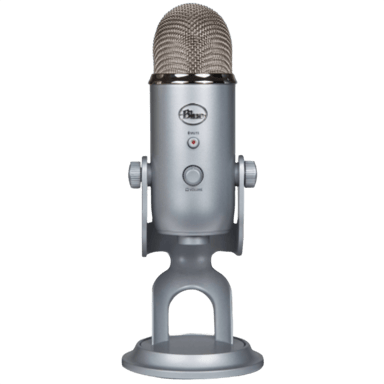

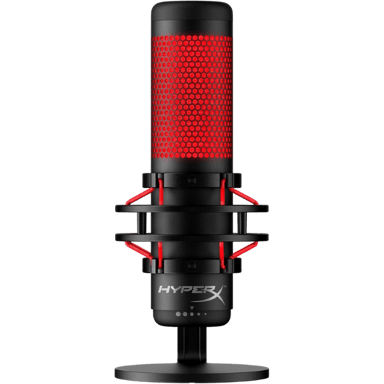
 Recaptor
 0
Cartling
0
Cartling
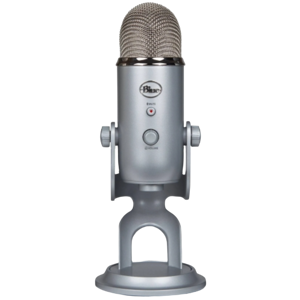
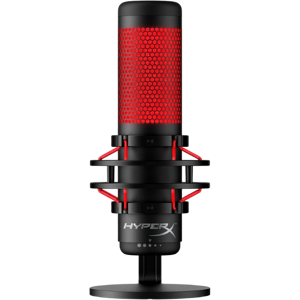
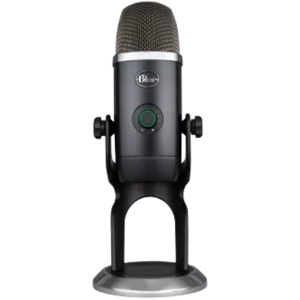


 13
13
 18
18
 18
18
 20
20